
Keep track of spending and consumption
Track planned and actual costs, attach receipts and record electricity, water or gas readings. Premium also lets you compare years.
FROM BUILDING TO LIVING
Plans, photos, expenses and important documents. Casvilo brings together what you need when building, renovating and living in your home.
No payment card needed. On your phone and computer.


Real interface · sample data
LESS SEARCHING. MORE CLARITY.
When you need a plan, receipt or photo of hidden wiring, you know where to look.
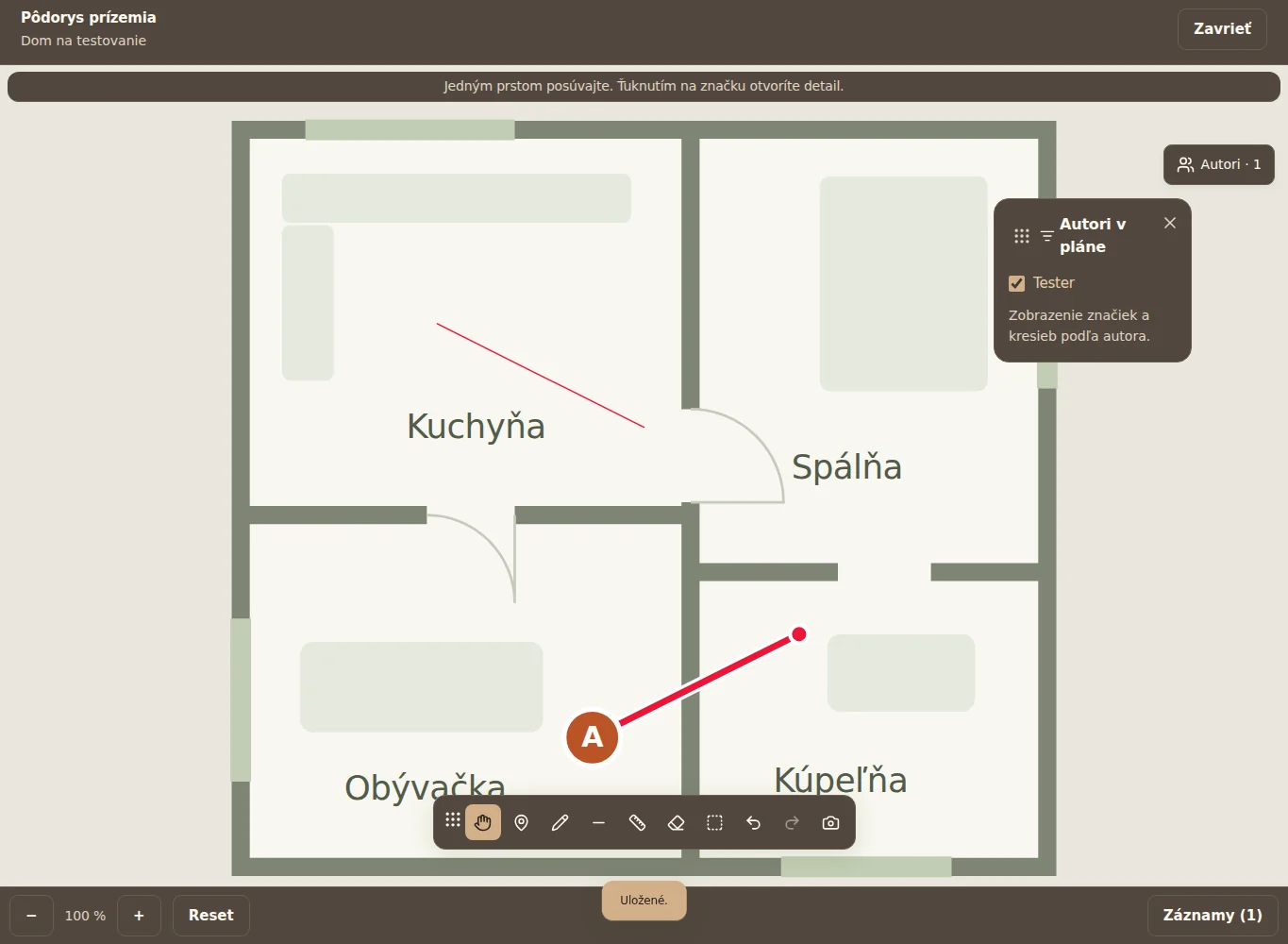
Open a PDF or image, zoom in and add markers, photos, tasks or dimensions. Each note stays attached to the place it describes.
Track planned and actual costs, attach receipts and record electricity, water or gas readings. Premium also lets you compare years.
Invite family or tradespeople, set permissions and coordinate through private or group messages. The owner decides who can view and edit the project.
Project data export
Photos in folders, inspection reports, manuals and warranties. When it is time to hand over or archive your data, create a clear PDF and download the originals in a ZIP.

All the features together
From the first idea to the finishing touches.
Floor plans and PDFs with your own markers, drawings and tasks. Choose who can see each marker and what needs approval.
Record work with the time, weather and temperature. Export to PDF; with Premium, add photos to entries too.
Planned and actual expenses. A single amount or a breakdown into materials and labour, with receipts attached.
Keep work and visits organised in a clear schedule. Assign people, track completed tasks and add optional reminders.
A Gantt timeline on your computer and a clear list of dates on mobile.
Compare quotes, attachments, suppliers and validity dates. Use your chosen quote for planned costs and edit it later.
From assignment through work and completion to checking. Keep the person responsible, due date, history and before-and-after photos with the plan marker.
Every detail has its place.
Original full-resolution photos, organised folders and photo details. Upload, move and download in bulk.
Folders and subfolders; upload progress is shown with your photos.
Room-by-room photos of wiring and pipes with notes. Know what is behind the walls, even years later.
Permits, contracts and inspection reports together. Add an issue date and a reminder if you need one.
Appliances, retailers, prices, receipts and manuals. See how many days remain on each warranty.
Set a repeat interval in Documents and inspections, record completion, cost and receipt. The history is preserved and the next date is prepared.
Hand an album over to another account for their project. The recipient accepts the invitation; a separate copy is created and your originals are kept.
A home you have a clear view of.
Electricity, water and gas readings. Track consumption and costs between readings, by month or year; Premium adds year-on-year comparisons.
Each home or construction site has its own project. Sign in to sync your data across your phone, tablet and computer.
Invite family or tradespeople and choose what they can view and edit. Premium belongs to the project owner; members do not need their own.
Invitations, new entries and marker approvals. Go straight from a notification to the relevant plan or task.
Choose categories, records, plans and photos. Preview the PDF before downloading; ZIP preserves originals and folders. Include financial details and names when needed.
Draft records and photos wait on your device and sync when the connection returns while the app is open. Conflicting versions are kept for you to resolve.
CASVILO BUSINESS
A simple workspace for tradespeople and teams. People, jobs, plans, working hours, materials and customer documents in one app.
50 GB for your business + 20 GB for personal projects

TAKE A LOOK INSIDE
Select a screenshot to enlarge it. These captures show the real interface with test and sample data.
01Project overview02Plan with markers03Export your project as PDF and ZIP 04Business overview
 05Dates and schedule
 06Home consumption07Project overview
 08Log work from your phone
 09Worker rates
Real interface · sample data · Interface screenshots are in Slovak.
AN EASY START
Start for free, right in your browser.
A new build, a renovation or the home you live in.
A photo, plan or receipt. Add the rest as you go.
SPACE TO SUIT YOUR NEEDS
One home or several projects. Choose what works for you.
HOME
The essentials for your home or build.
0 € / free
HOME PREMIUM 14 days free
More space. More possibilities.
CASVILO BUSINESS
Your business. Your jobs under control.
Planned price
Paid subscriptions are in preparation. Planned prices: €2.99 monthly or €24.99 yearly. Free and a 14-day Premium trial without a card are available now. The trial does not automatically become paid.
Paid purchasing is being prepared. Check Business availability in the app or with support; clicking this website does not place an order. Premium and subscriptions ↗
Need more storage or a tailored solution?
GOOD TO KNOW
Answers before you sign up.
The trial is available once per account, without a card or automatic payment. Free applies when it ends. Paid Premium starts only after an explicit purchase.
Yes. The Free limit of 35 photos covers the whole gallery, including folders. Storage is limited to 500 MB; Premium provides a shared 20 GB for the owner’s projects and attachments.
Ending Premium does not delete your account. Free limits apply and excess photos may be locked. You have a protected period of at least 90 days to export them. Automatic deletion is currently disabled; any future removal will be announced in advance.
You can work with data already available on the device. Files not yet loaded need a connection. Sync continues with the app open; check that uploads have finished before clearing browser data.
Request deletion of your entire account in Profile after confirming your password and email. Export your data first. For support and personal data rights, contact info@casvilo.com.
Use it now in a browser on your phone, tablet and computer. App Store and Google Play versions are in preparation and are not yet published in the stores.
Start with one project. Add the rest as you go.